Project Links
Tech Stack
Kubernetes Pod Security Standards and Network Policies
RBAC decides who can act in the cluster. This covers the other two layers on EKS: the restricted Pod Security profile (no root, no privilege escalation) and network policies that only allow the paths each pod needs.
Enforced Pod Security Standards (restricted profile) and Network Policy microsegmentation on a production-style EKS environment. Containers cannot run as root or escalate their privileges. On top of the Pod Security restricted requirements, additional container hardening is applied — including read-only root filesystems and dropping all Linux capabilities. Pods can only talk to each other on paths that are explicitly allowed — everything else is blocked. Together with RBAC hardening, this covers the three core layers of Kubernetes security.
The Three Layers
Each layer closes a different gap. You need all three:
RBAC — controls who can take actions in the cluster. A developer, a CI pipeline, a monitoring agent — each gets only the permissions it actually needs. Covered in the RBAC Hardening project.
Pod Security Standards — controls what a container is allowed to do once it is running. Can it run as root? Can it access the host network? Can it escalate its own privileges? This project covers this layer.
Network Policies — controls which pods can talk to which. Without this, every pod in the cluster can reach every other pod by default. This project covers this layer too.

Environment
AWS EKS — production-style personal environment
 ├── production namespace
 │    ├── API pods
 │    └── Worker pods
 ├── data namespace
 │    └── Postgres pods
 ├── monitoring namespace
 │    └── Prometheus
 └── ingress-nginx namespace
      └── Ingress controller
Pod Security Standards
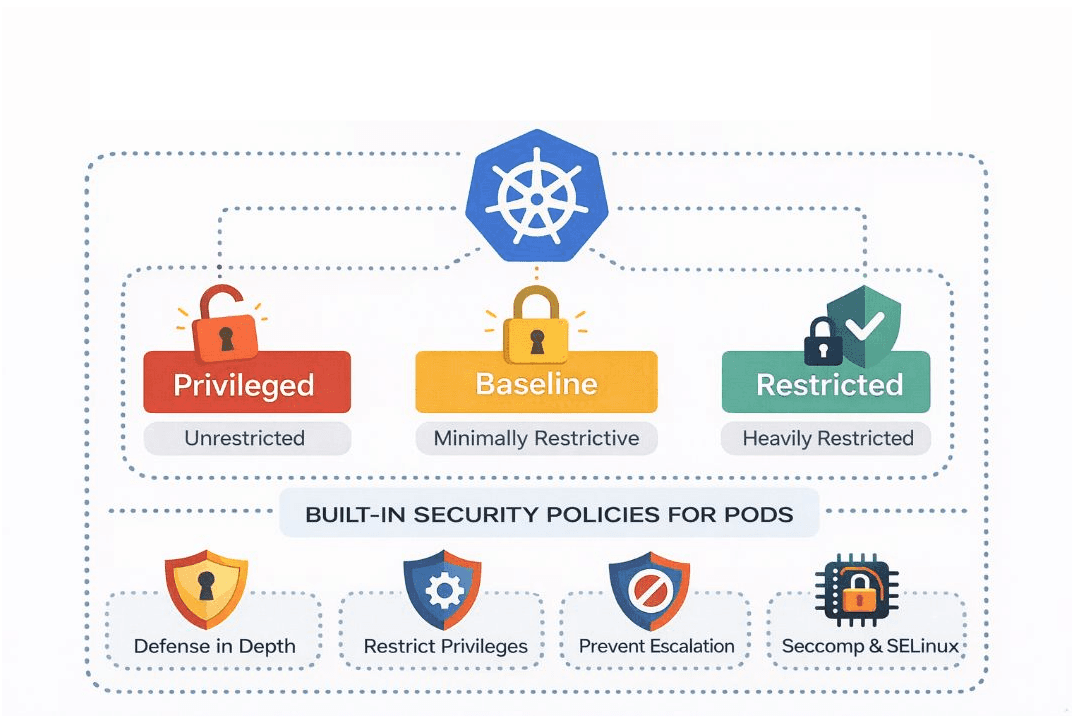
Kubernetes ships with three security profiles:
Privileged — no restrictions. A container can do almost anything the host can do.
Baseline — blocks the most dangerous settings like host network access and privileged containers, but still fairly permissive.
Restricted — the strictest. Containers must run as a non-root user, cannot escalate their own privileges, must drop dangerous Linux capabilities, and must define a seccomp profile. This is the profile enforced here, with
readOnlyRootFilesystem: trueadded on top as an extra hardening measure — it is not part of the restricted profile itself.
This project enforces the restricted profile on the production namespace. It is applied as a label on the namespace itself — so any new pod that does not comply is rejected by admission before it can be created. You do not need to check individual pods.
The safe way to introduce this is to start in audit mode. Audit mode logs violations without blocking anything — so you can see what would break before anything actually does:
kubectl label namespace production pod-security.kubernetes.io/enforce=restricted pod-security.kubernetes.io/audit=restricted pod-security.kubernetes.io/warn=restrictedWhy audit first? If you switch straight to enforce mode on a running namespace, any pod that does not comply will be rejected the next time it restarts — which could mean a deployment silently failing at 2am. Audit mode gives you a full picture of what needs fixing before you enforce anything.
After a few days in audit mode, check what violations are showing up:
kubectl get events -n production | grep -i "violates PodSecurity"Once all workloads are compliant, switch to enforce. Now try creating a non-compliant pod to confirm it is actually rejected:
kubectl run test-root --image=nginx -n production

# Error from server (Forbidden): pods "test-root" is forbidden:
# violates PodSecurity "restricted:latest": allowPrivilegeEscalation != false,
# runAsNonRoot != true, seccompProfile not set
The error tells you exactly which fields failed — which makes fixing workloads straightforward.
Updating Deployments to Comply
Every deployment running in the production namespace needs an explicit security context. Here is what a compliant spec looks like:
spec:
  securityContext:
    runAsNonRoot: true      # container cannot run as the root user
    runAsUser: 1000         # runs as a specific non-root user ID
    seccompProfile:
      type: RuntimeDefault  # uses the container runtime's built-in security filter
  containers:
  - name: api
    securityContext:
      allowPrivilegeEscalation: false  # cannot gain more permissions than it started with
      readOnlyRootFilesystem: true     # cannot write to its own filesystem
      capabilities:
        drop: ["ALL"]                  # drops every Linux system capability
The most disruptive of these in practice is readOnlyRootFilesystem: true. It sounds simple, but many applications write to their own filesystem without you realising it. Common examples:
Node.js apps — often write temporary files to
/tmpduring startupWeb servers like nginx or Apache — write pid files (a small file that stores the process ID) to
/var/runLogging libraries — some buffer log output to a local file before sending it
Package managers — npm, pip, and others write cache files during installation
When readOnlyRootFilesystem: true is set and the application tries to write, it crashes. The fix is to mount a writable volume specifically for the directories the application needs:
    volumeMounts:
    - name: tmp
      mountPath: /tmp          # gives the app a writable /tmp directory
    - name: run
      mountPath: /var/run      # gives the app a writable /var/run directory
  volumes:
  - name: tmp
    emptyDir: {}             # temporary storage — wiped when the pod restarts
  - name: run
    emptyDir: {}
Apply the compliant deployment to confirm it is accepted:
kubectl apply -f examples/compliant-deployment.yaml -n production
# Expected: deployment.apps/api created
Network Policies: Default Deny
By default in Kubernetes, every pod can reach every other pod — even across namespaces. That means if one pod is compromised, an attacker can use it to probe or attack anything else running in the cluster.
Network Policies change that. The approach here is:
Block everything first
Allow DNS so pods can still resolve hostnames
Allow only the specific traffic paths that are actually needed
Test that allowed paths work and blocked paths are actually blocked

One important detail specific to EKS: creating a NetworkPolicy object and actually enforcing network isolation are two different things. On EKS, the AWS VPC CNI must have its Network Policy capability explicitly enabled — otherwise the policies exist in the cluster but have no effect on traffic. Enable it first:
aws eks update-addon   --cluster-name YOUR_CLUSTER_NAME   --addon-name vpc-cni   --configuration-values '{"enableNetworkPolicy": "true"}'

# Confirm it is active
kubectl get pods -n kube-system | grep network-policy
Then apply the policies and test. The connectivity tests below are what prove enforcement is actually working — not just that the resources exist.
Step 1 — Block everything:
apiVersion: networking.k8s.io/v1
kind: NetworkPolicy
metadata:
  name: default-deny-all
  namespace: production
spec:
  podSelector: {}   # applies to all pods in this namespace
  policyTypes:
  - Ingress           # block all incoming traffic
  - Egress            # block all outgoing traffic
Step 2 — Restore DNS immediately. After applying a default-deny policy covering egress, pods can no longer reach DNS unless DNS egress is explicitly allowed. Without DNS, pods cannot resolve any hostname — your app cannot reach the database by name, cannot call external services, nothing. Apply the DNS allow policy straight after:
kubectl apply -f network-policies/default-deny-all.yaml -n production
kubectl apply -f network-policies/allow-dns-egress.yaml -n production
Step 3 — Allow only what is needed. Each rule opens one specific path:
# Allow the ingress controller to reach the API pods
apiVersion: networking.k8s.io/v1
kind: NetworkPolicy
metadata:
  name: allow-ingress-to-api
  namespace: production
spec:
  podSelector:
    matchLabels:
      app: api
  policyTypes:
  - Ingress
  ingress:
  - from:
    - namespaceSelector:
        matchLabels:
          kubernetes.io/metadata.name: ingress-nginx
    ports:
    - protocol: TCP
      port: 3000
# Allow API pods to connect to PostgreSQL in the data namespace
apiVersion: networking.k8s.io/v1
kind: NetworkPolicy
metadata:
name: allow-api-to-data
namespace: production
spec:
podSelector:
matchLabels:
app: api
policyTypes:
- Egress
egress:
- to:
- namespaceSelector:
matchLabels:
kubernetes.io/metadata.name: data
ports:
- protocol: TCP
port: 5432Step 4 — Test both directions. Confirming a policy resource exists is not the same as confirming it works. Test allowed paths and blocked paths:
# Ingress controller → API pods (permitted)
kubectl exec -it <ingress-pod> -n ingress-nginx --   curl http://api.production:3000/healthz
# Expected: 200 OK

# API → PostgreSQL:5432 (permitted)
kubectl exec -it <api-pod> -n production -- nc -zv postgres.data 5432
# Expected: Connection to postgres.data 5432 port [tcp/postgresql] succeeded!
# Worker → Prometheus (blocked — no policy permits this)
kubectl exec -it <worker-pod> -n production -- curl http://prometheus.monitoring:9090
# Expected: curl: (28) Connection timed out after 5000 milliseconds
# Worker → PostgreSQL (blocked — only API pods are permitted here)
kubectl exec -it <worker-pod> -n production -- nc -zv postgres.data 5432
# Expected: nc: connect to postgres.data port 5432 (tcp) failed: Connection timed outKey Decisions
Enforce at the namespace level, not per pod. If you add security contexts only to individual pod specs, any new pod — from a new deployment, a Helm chart, a CI pipeline — can still land without complying. The namespace label catches everything automatically, regardless of where it comes from.
Default deny before any allow rules. Starting with deny-all means every permitted path is a deliberate decision. Starting with allow rules and tightening later creates gaps that are easy to miss.
Verify the CNI actually enforces Network Policies. On EKS, the AWS VPC CNI needs to have its Network Policy capability enabled — otherwise the policy resources exist in the cluster but have no effect on traffic. The only way to know it is working is to apply a deny policy and actually test that traffic is blocked.
Network Policies are additive. If two policies both select the same pod, Kubernetes combines them — a pod is allowed to receive traffic if any policy permits it. You cannot use a second policy to take away what the first policy allowed. This means getting selector design right from the start matters more than it might seem.
Results
After applying both layers across the production namespace:
Container privileges — containers can no longer run as root, escalate privileges, or access the host network. Three existing deployments required security context updates before enforce mode could be enabled.
Pod-to-pod traffic — four explicit allow paths, everything else blocked. Pods in the production namespace can only reach what they are supposed to reach.
Lateral movement — a compromised pod previously had unrestricted network access across every namespace. Now it is contained to only the paths its NetworkPolicy permits.
What I Learned
readOnlyRootFilesystem: true causes more breakage than expected. The assumption going in was that application pods do not write to their own filesystem — in practice, most do in small ways that are easy to miss. Running in audit mode first is what made fixing those workloads manageable. Without it, enabling enforce mode would have caused silent deployment failures.
The additive NetworkPolicy behaviour is also worth knowing before you start. If two policies select the same pod, Kubernetes unions the rules. There is no way to use a second policy to undo what the first policy allowed — you have to think through the selector design upfront.
What I'd Do Differently
I'd add a Kyverno policy that automatically creates the default-deny NetworkPolicy on every new namespace. Right now, a new namespace starts with open traffic until someone manually applies the policy — which relies on someone remembering. A Kyverno generate rule closes that gap. It is a natural next step from the RBAC hardening project, where Kyverno already blocks new cluster-admin bindings at the API level.
The full manifests and automated test script are in the repo. tests/security-tests.sh runs all the permitted and blocked path tests and reports pass or fail for each.
Project Links
Tech Stack
Kubernetes Security · 2 parts