
When I first learned about init containers, I thought they were a niche feature I'd rarely use. Six months later I was using them in almost every production deployment. Sidecar containers felt even more obscure — until I realised that if you've ever used a service mesh, a log shipper, or a reverse proxy running next to your application, you've already been using sidecars.
Both patterns solve real problems. Understanding what those problems are — and when each pattern is the right tool — is what this article is about. In Kubernetes Pod Lifecycle, I covered what happens during pod startup. This goes deeper on two specific parts of that lifecycle.
Init Containers: Setup That Has to Finish Before Your App Starts
An init container is a container that runs to completion before any of your main application containers start. If it fails, Kubernetes restarts it until it succeeds. Your app does not start until every init container has finished successfully.
The most common use cases I reach for them:
- Waiting for a dependency — your app needs the database to be ready before it starts, but Kubernetes has no built-in way to express that ordering
- Running database migrations — you want migrations to complete before the new version of your app starts serving traffic
- Downloading config or secrets — fetch configuration from an external source and write it to a shared volume before the app reads it
- Setting file permissions — some containers run as non-root but need files owned by a specific user
A Real Example: Waiting for PostgreSQL
Without an init container, your application might start before the database is ready and fail immediately. With one, it waits:
apiVersion: apps/v1
kind: Deployment
metadata:
  name: my-app
spec:
  template:
    spec:
      initContainers:
      - name: wait-for-postgres
        image: busybox:1.36
        command:
        - sh
        - -c
        - |
          until nc -z postgres-service 5432; do
            echo "Waiting for PostgreSQL..."
            sleep 2
          done
          echo "PostgreSQL is ready"

      - name: run-migrations
        image: my-app:latest
        command: ["node", "migrate.js"]
        env:
        - name: DATABASE_URL
          valueFrom:
            secretKeyRef:
              name: app-secrets
              key: database_url

      containers:
      - name: my-app
        image: my-app:latest
        ports:
        - containerPort: 8080
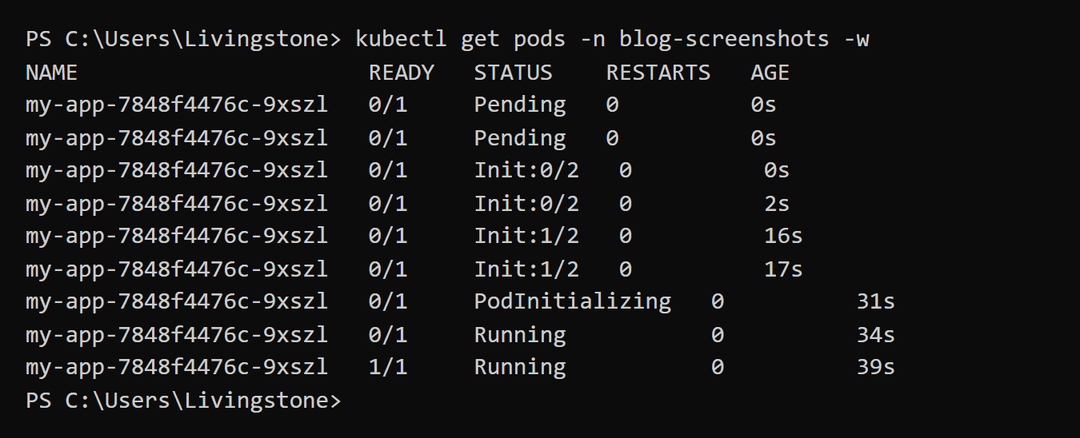
A few things to notice here:
- The init containers run in order —
wait-for-postgrescompletes first, thenrun-migrations, then the main container starts - The migrations image is the same as the app image — no need to maintain a separate image just for migrations
- If migrations fail, the pod stays in
Init:Errorstate and your old pods keep serving traffic
Sharing Data Between Init and Main Containers
Init containers and main containers can share data through volumes. This is how you download a config file in an init container and make it available to your app:
spec:
  volumes:
  - name: config-volume
    emptyDir: {}

  initContainers:
  - name: fetch-config
    image: curlimages/curl:latest
    command:
    - sh
    - -c
    - |
      curl -o /config/app.json         https://config-service/api/config
    volumeMounts:
    - name: config-volume
      mountPath: /config

  containers:
  - name: my-app
    image: my-app:latest
    volumeMounts:
    - name: config-volume
      mountPath: /etc/app/config
      readOnly: true
Sidecar Containers: Always Running Alongside Your App
A sidecar is a container that runs in the same pod as your main application, for the entire lifetime of the pod. Where an init container does its job and exits, a sidecar stays running.
You've almost certainly used sidecars already without thinking of them that way. Istio's Envoy proxy, Datadog's agent container, Fluentd log shippers — these are all sidecars. The pattern is: your application focuses on its job, the sidecar handles a cross-cutting concern without your app needing to know about it.
Common real-world sidecar use cases:
- Log shipping — a Fluentd or Promtail sidecar reads your app's log files and forwards them to a central log store
- Proxy and service mesh — Istio injects an Envoy sidecar that handles all network traffic, adding retries, circuit breaking, and mTLS without code changes
- Metrics collection — a Prometheus exporter sidecar that scrapes your app's metrics and exposes them in Prometheus format
- Secret sync — a sidecar that watches for secret rotation and updates a shared volume without restarting the main container
A Log Shipping Sidecar
Your app writes logs to a file. A Promtail sidecar reads those files and ships them to Loki. The app doesn't need to know anything about Loki:
spec:
  volumes:
  - name: app-logs
    emptyDir: {}
  - name: promtail-config
    configMap:
      name: promtail-config

  containers:
  - name: my-app
    image: my-app:latest
    volumeMounts:
    - name: app-logs
      mountPath: /var/log/app

  - name: log-shipper
    image: grafana/promtail:latest
    args:
    - -config.file=/etc/promtail/config.yaml
    volumeMounts:
    - name: app-logs
      mountPath: /var/log/app
      readOnly: true
    - name: promtail-config
      mountPath: /etc/promtail
Native Sidecars in Kubernetes 1.29+
Before Kubernetes 1.29, sidecars were just regular containers — there was no way to tell Kubernetes that a container was a sidecar rather than a main application container. This caused a problem: if a sidecar crashed, Kubernetes didn't know it should restart just that container rather than the whole pod. It also meant sidecars and init containers had no guaranteed startup ordering relative to each other.
Kubernetes 1.29 introduced native sidecar support. You define a sidecar inside initContainers but with restartPolicy: Always. This tells Kubernetes to start it before the main containers and keep it running for the pod's lifetime:
initContainers:
# This init container runs once and exits (normal behaviour)
- name: run-migrations
  image: my-app:latest
  command: ["node", "migrate.js"]

# This is a native sidecar — starts with init containers but stays running
- name: log-shipper
  image: grafana/promtail:latest
  restartPolicy: Always
  volumeMounts:
  - name: app-logs
    mountPath: /var/log/app
    readOnly: true

containers:
- name: my-app
  image: my-app:latest
The advantage: Kubernetes now understands the intent. The log shipper starts before the main app, stays running throughout, and gets restarted independently if it crashes. This is cleaner than the old approach of putting sidecars in the main containers list and hoping they started in a useful order.
Init vs Sidecar: How to Choose
The rule is simple:
- If the work needs to happen before your app starts and then it's done — use an init container
- If the work needs to run continuously alongside your app — use a sidecar
A migration is an init container. A log shipper is a sidecar. A health check that configures the app before startup is an init container. An Envoy proxy is a sidecar.
One more thing: keep your init containers and sidecars small. A 2GB init container that just waits for a database will slow down every pod startup. Use minimal images — busybox or curlimages/curl for simple checks, or the actual application image only when you need the application's runtime.
For the broader picture of how all these containers fit into the pod lifecycle, see Kubernetes Pod Lifecycle: From Scheduling to Termination. And if you're using sidecars for observability, Full Observability Stack on Kubernetes covers the Loki + Promtail setup in detail.

Comments
All comments are reviewed before appearing.
Leave a Comment