
I've been in post-mortems where someone says "we have a runbook for that." And then we open it and it says something like "check the logs and identify the root cause of the issue." Useless. That's not a runbook — that's someone describing the concept of debugging without actually helping you debug.
I've also worked with runbooks that genuinely saved us during incidents — where an engineer who had never seen the system before could follow the steps and resolve the problem without calling anyone at 2 AM. The difference between those two extremes is what this article is about.

What Makes Most Runbooks Useless
Bad runbooks fail for predictable reasons. They're written after the incident as a post-mortem deliverable — describing what happened, not what to do next time. They're too abstract ("check for errors") instead of concrete ("run this command, look for this output"). They're stored somewhere nobody can access quickly when things are actually broken.
A useful runbook answers six questions, in order: What triggered this? What does it actually mean? What do I check first? How do I fix each likely cause? How do I confirm it's fixed? Who do I escalate to if this doesn't work?
A Real Example: CrashLoopBackOff
Here's what a useful runbook for a common alert actually looks like:
# Alert: Pod CrashLoopBackOff

## What this means
A container is starting, failing, and being restarted in a loop.
Could be: application error, OOMKill, bad config, dependency not ready.

## Step 1 — Find the pod
kubectl get pods -n NAMESPACE | grep -v Running

## Step 2 — Check the exit reason
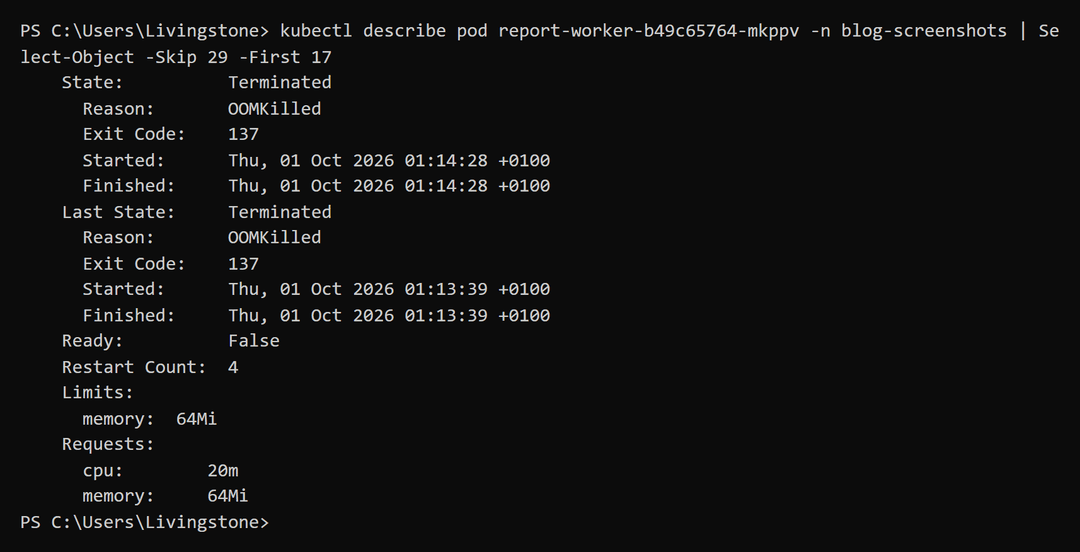
kubectl describe pod POD_NAME -n NAMESPACE
# Look for: "Exit Code" and "Reason" under Last State

## Exit Code 137 = OOMKill (memory limit exceeded)
kubectl top pod POD_NAME -n NAMESPACE --containers
# If usage is near the limit, increase memory limit or investigate the leak

## Exit Code 1 = Application crashed
kubectl logs POD_NAME -n NAMESPACE --previous | tail -50
# Read the actual error message

## Exit Code 0 = App is exiting without error
# Check the entrypoint command — something is telling it to exit cleanly

## Confirm it's fixed
kubectl get pod POD_NAME -n NAMESPACE -w
# Should show Running with 0 recent restarts

## Escalate to: @platform-team if not resolved in 20 minutes
Notice how specific it is. Every step has an actual command. Every outcome has an interpretation. Someone who has never seen this alert before can work through it without making judgment calls. Most of the commands come from the kubectl toolkit I use when things break.
Tie Runbooks Directly to Alerts
The best practice I've adopted: every alert has a runbook URL in its annotation. When the alert fires in Slack or PagerDuty, the link is right there. No searching:
- alert: PodCrashLooping
  expr: rate(kube_pod_container_status_restarts_total[15m]) > 0
  for: 5m
  annotations:
    summary: "Pod {{ $labels.pod }} keeps restarting"
    runbook_url: "https://github.com/your-org/runbooks/blob/main/alerts/pod-crash-looping.md"
This forces you to write the runbook when you write the alert — before any incident happens. It also means you have to think through the remediation steps while you're calm, not while you're stressed at midnight. The Prometheus and Alertmanager setup I use to route these alerts to Slack is in Kubernetes Observability on EKS.
Store Runbooks in Git
The location matters. Internal wikis are great until the VPN is down. Confluence is fine until it's the thing that's broken. Git repositories are accessible from almost anywhere, version controlled, and searchable:
runbooks/
├── alerts/
│   ├── pod-crash-looping.md
│   ├── node-not-ready.md
│   ├── high-memory-usage.md
│   └── service-not-routing.md
└── procedures/
    ├── node-drain.md
    ├── cluster-upgrade.md
    └── certificate-renewal.md
Test Your Runbooks Before You Need Them
A runbook you've never tested is a runbook of unknown quality. The only way to know it works is to use it. Set a low memory limit intentionally and trigger an OOMKill. Follow the runbook. See where it falls apart. Fix it.
It's uncomfortable to deliberately break things. But it's much less uncomfortable than realising your runbook has a gap at 3 AM during an actual incident.
The goal is simple: an engineer who has never seen your system should be able to navigate an incident without calling you. When your runbooks meet that standard, you've built something genuinely valuable — not just documentation that checks a compliance box.

Comments
All comments are reviewed before appearing.
Leave a Comment