
Running terraform apply in the wrong environment is one of those mistakes you only make once. Most Terraform tutorials show you a single main.tf that provisions one environment — that works fine until you need dev, staging, and production with different sizes, different configurations, and separate state files so a mistake in dev can never touch production.
This is a complete walkthrough of how to structure that properly. By the end you will have separate state per environment, reusable modules, and a setup you can actually follow from scratch.
This is Part 1 of the Production EKS on AWS series. It covers the networking foundation — VPC, subnets, NAT Gateways, and route tables — that the EKS cluster in Part 2 deploys into. Both parts live in the same repository: eks-terraform-foundation.
Prerequisites
Before starting, make sure you have these installed and configured:
# Check Terraform version (need >= 1.5)
terraform --version

# Check AWS CLI is configured
aws sts get-caller-identity
# Should return your account ID, user ID, and ARN

# If not configured yet
aws configure
# Enter: Access Key ID, Secret Access Key, Region (e.g. eu-west-1), output format (json)
You will need an AWS IAM user or role with permissions to create the resources in this guide. At minimum: EC2, VPC, S3, DynamoDB, and IAM.
The Problem with a Single Environment Setup
When you start with Terraform you typically write something like this:
provider "aws" {
  region = "eu-west-1"
}

resource "aws_instance" "app" {
  ami           = "ami-0c02fb55956c7d316"
  instance_type = "t3.micro"
}
This creates one server. Running terraform apply again with a different instance_type changes the same server. There is no separation between environments — every change goes to the same place.
For real infrastructure you need dev, staging, and production to be completely isolated. A broken terraform apply in dev should not be able to touch production resources.
The Solution: Separate State + Shared Modules
The structure we will build looks like this:
terraform-multi-env/
├── bootstrap/                    # Run once — creates S3 + DynamoDB for remote state
│   ├── main.tf                   # S3 bucket, versioning, encryption, DynamoDB lock table
│   └── variables.tf              # region, project_name
├── modules/
│   └── networking/               # VPC, subnets, NAT gateways (1 per AZ), route tables
│       ├── main.tf               # VPC module, NAT gateways, subnet tags for EKS
│       ├── variables.tf          # project_name, environment, CIDRs, AZs, tags
│       └── outputs.tf            # vpc_id, private_subnet_ids, public_subnet_ids, nat_public_ips
├── environments/
│   ├── dev/                      # 2 AZs, 10.1.0.0/16 — cheaper for testing
│   │   ├── main.tf               # Backend config (dev/terraform.tfstate), calls networking module
│   │   ├── variables.tf          # project_name, environment, region, vpc_cidr, AZs, subnets
│   │   ├── outputs.tf            # vpc_id, private_subnets, public_subnets, nat_ips
│   │   └── terraform.tfvars      # Environment-specific values — edit this before applying
│   ├── staging/                  # 2 AZs, 10.2.0.0/16
│   │   ├── main.tf               # Backend config (staging/terraform.tfstate)
│   │   ├── variables.tf
│   │   ├── outputs.tf
│   │   └── terraform.tfvars
│   └── production/               # 3 AZs, 10.0.0.0/16 — full high availability
│       ├── main.tf               # Backend config (production/terraform.tfstate)
│       ├── variables.tf
│       ├── outputs.tf
│       └── terraform.tfvars      # 3 AZs, larger CIDRs — separate state from dev
├── .gitignore                    # Excludes .terraform/, *.tfstate, *.tfplan
└── README.md                     # Setup steps, backend config, day-to-day workflow
Each environment has its own backend (S3 key) so its state is stored separately. All environments use the same modules, just with different variable values.
Step 1: Bootstrap the State Backend
Before you can use Terraform properly, you need somewhere to store the state file. State is Terraform's record of what it created — without it, Terraform cannot know what already exists.
The standard approach is S3 for storage and DynamoDB for locking (so two people cannot run terraform apply at the same time and corrupt the state).
Create bootstrap/main.tf:
terraform {
  required_version = ">= 1.5"
  required_providers {
    aws = {
      source  = "hashicorp/aws"
      version = "~> 5.0"
    }
  }
}

provider "aws" {
  region = var.region
}

data "aws_caller_identity" "current" {}

# S3 bucket to store all Terraform state files
resource "aws_s3_bucket" "state" {
  bucket = "${var.project_name}-tfstate-${data.aws_caller_identity.current.account_id}"

  # Prevent accidental deletion of the state bucket
  lifecycle {
    prevent_destroy = true
  }
}

# Enable versioning so you can recover from accidental state corruption
resource "aws_s3_bucket_versioning" "state" {
  bucket = aws_s3_bucket.state.id
  versioning_configuration {
    status = "Enabled"
  }
}

# Encrypt state at rest
resource "aws_s3_bucket_server_side_encryption_configuration" "state" {
  bucket = aws_s3_bucket.state.id
  rule {
    apply_server_side_encryption_by_default {
      sse_algorithm = "AES256"
    }
  }
}

# Block all public access to the state bucket
resource "aws_s3_bucket_public_access_block" "state" {
  bucket                  = aws_s3_bucket.state.id
  block_public_acls       = true
  block_public_policy     = true
  ignore_public_acls      = true
  restrict_public_buckets = true
}

# DynamoDB table for state locking
resource "aws_dynamodb_table" "state_lock" {
  name         = "${var.project_name}-tfstate-lock"
  billing_mode = "PAY_PER_REQUEST"
  hash_key     = "LockID"

  attribute {
    name = "LockID"
    type = "S"
  }
}

output "state_bucket" {
  value = aws_s3_bucket.state.bucket
  description = "Copy this into your environment backend configs"
}

output "account_id" {
  value = data.aws_caller_identity.current.account_id
}
Create bootstrap/variables.tf:
variable "region" {
  description = "AWS region"
  type        = string
  default     = "eu-west-1"
}

variable "project_name" {
  description = "Used as a prefix for all resources"
  type        = string
  default     = "myproject"
}
Deploy the bootstrap (this is the only time you run Terraform without a remote backend — state is stored locally here):
cd bootstrap
terraform init
terraform apply

# Note the outputs
# state_bucket = "myproject-tfstate-123456789012"
# account_id   = "123456789012"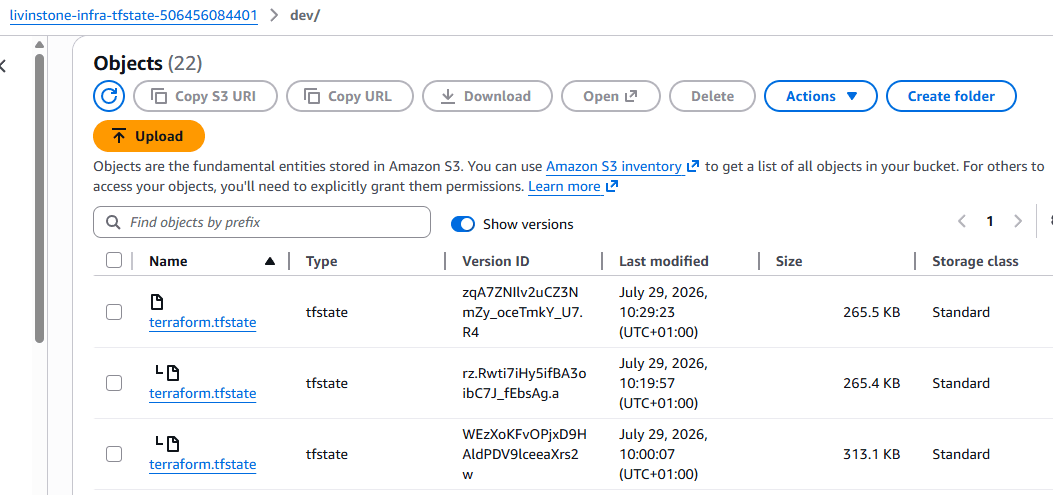
Step 2: Create the Networking Module
Modules are reusable pieces of infrastructure. You write them once and call them from each environment with different inputs.
Create modules/networking/main.tf:
module "vpc" {
  source  = "terraform-aws-modules/vpc/aws"
  version = "~> 5.0"

  name = "${var.environment}-${var.project_name}-vpc"
  cidr = var.vpc_cidr

  azs             = var.availability_zones
  private_subnets = var.private_subnet_cidrs
  public_subnets  = var.public_subnet_cidrs

  # One NAT gateway per AZ for high availability
  # If you use single_nat_gateway = true and that AZ goes down,
  # private subnet instances lose internet access entirely
  enable_nat_gateway     = true
  single_nat_gateway     = false
  one_nat_gateway_per_az = true

  enable_dns_hostnames = true
  enable_dns_support   = true

  # Tags required by EKS to discover subnets for load balancers
  public_subnet_tags = {
    "kubernetes.io/role/elb" = "1"
  }

  private_subnet_tags = {
    "kubernetes.io/role/internal-elb" = "1"
  }

  tags = var.tags
}
Create modules/networking/variables.tf:
variable "project_name"         { type = string }
variable "environment"          { type = string }
variable "vpc_cidr"             { type = string }
variable "availability_zones"   { type = list(string) }
variable "private_subnet_cidrs" { type = list(string) }
variable "public_subnet_cidrs"  { type = list(string) }
variable "tags"                 { type = map(string) default = {} }
Create modules/networking/outputs.tf:
output "vpc_id"             { value = module.vpc.vpc_id }
output "private_subnet_ids" { value = module.vpc.private_subnets }
output "public_subnet_ids"  { value = module.vpc.public_subnets }
output "nat_public_ips"     { value = module.vpc.nat_public_ips }
Step 3: Wire Up an Environment
Now create the dev environment that calls all the modules. Create environments/dev/main.tf:
terraform {
  required_version = ">= 1.5"
  required_providers {
    aws = {
      source  = "hashicorp/aws"
      version = "~> 5.0"
    }
  }

  # Each environment has its own state file under a different key
  # Replace ACCOUNT_ID with the value from the bootstrap output
  backend "s3" {
    bucket         = "myproject-tfstate-ACCOUNT_ID"
    key            = "dev/terraform.tfstate"
    region         = "eu-west-1"
    encrypt        = true
    dynamodb_table = "myproject-tfstate-lock"
  }
}

provider "aws" {
  region = var.region

  # Apply these tags to every resource this provider creates
  default_tags {
    tags = local.tags
  }
}

locals {
  tags = {
    Project     = var.project_name
    Environment = var.environment
    ManagedBy   = "terraform"
  }
}

# Create the VPC and subnets
module "networking" {
  source = "../../modules/networking"

  project_name         = var.project_name
  environment          = var.environment
  vpc_cidr             = var.vpc_cidr
  availability_zones   = var.availability_zones
  private_subnet_cidrs = var.private_subnet_cidrs
  public_subnet_cidrs  = var.public_subnet_cidrs
  tags                 = local.tags
}
Create environments/dev/variables.tf:
variable "project_name" {
  type    = string
  default = "myproject"
}

variable "environment" {
  type    = string
  default = "dev"
}

variable "region" {
  type    = string
  default = "eu-west-1"
}

variable "vpc_cidr" {
  type    = string
  default = "10.1.0.0/16"
}

variable "availability_zones" {
  type    = list(string)
  default = ["eu-west-1a", "eu-west-1b"]  # 2 AZs for dev to keep costs down
}

variable "private_subnet_cidrs" {
  type    = list(string)
  default = ["10.1.1.0/24", "10.1.2.0/24"]
}

variable "public_subnet_cidrs" {
  type    = list(string)
  default = ["10.1.101.0/24", "10.1.102.0/24"]
}
Create environments/dev/terraform.tfvars:
# All values are set in variables.tf defaults — no changes needed for devCreate environments/dev/outputs.tf:
output "vpc_id"          { value = module.networking.vpc_id }
output "private_subnets" { value = module.networking.private_subnet_ids }
output "public_subnets"  { value = module.networking.public_subnet_ids }
output "nat_ips"         { value = module.networking.nat_public_ips }
Step 4: Deploy Dev
cd environments/dev

# Download required providers and modules
terraform init

# Preview what will be created — always read this before applying
terraform plan -out=dev.tfplan

# Apply the plan
terraform apply dev.tfplan
The first run takes 5-10 minutes. The NAT gateways take the longest. You should see output like:
Apply complete! Resources: 28 added, 0 changed, 0 destroyed.

Outputs:

vpc_id          = "vpc-0abc123def456789"
private_subnets = ["subnet-0abc...", "subnet-0def..."]
nat_ips         = ["52.x.x.x", "54.x.x.x"]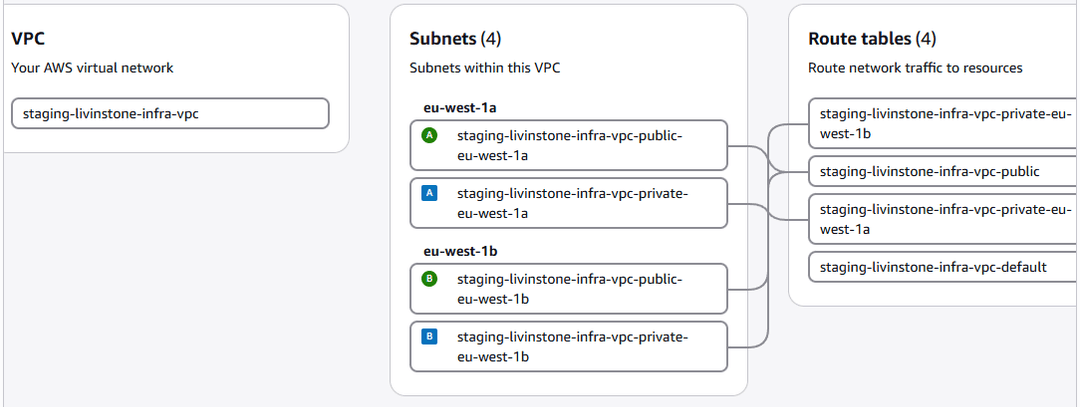
Step 5: Production Environment
Production uses the same modules but different values — 3 AZs instead of 2, larger CIDRs, and a separate state key so it is completely isolated from dev.
Create environments/production/main.tf — identical structure to dev but with a different backend key:
terraform {
  required_version = ">= 1.5"
  required_providers {
    aws = { source = "hashicorp/aws" version = "~> 5.0" }
  }

  backend "s3" {
    bucket         = "myproject-tfstate-ACCOUNT_ID"
    key            = "production/terraform.tfstate"   # different key = separate state
    region         = "eu-west-1"
    encrypt        = true
    dynamodb_table = "myproject-tfstate-lock"
  }
}

provider "aws" {
  region = var.region
  default_tags {
    tags = local.tags
  }
}

locals {
  tags = {
    Project     = var.project_name
    Environment = var.environment
    ManagedBy   = "terraform"
  }
}

module "networking" {
  source = "../../modules/networking"

  project_name         = var.project_name
  environment          = var.environment
  vpc_cidr             = var.vpc_cidr
  availability_zones   = var.availability_zones
  private_subnet_cidrs = var.private_subnet_cidrs
  public_subnet_cidrs  = var.public_subnet_cidrs
  tags                 = local.tags
}
Create environments/production/terraform.tfvars:
vpc_cidr             = "10.0.0.0/16"
availability_zones   = ["eu-west-1a", "eu-west-1b", "eu-west-1c"]
private_subnet_cidrs = ["10.0.1.0/24", "10.0.2.0/24", "10.0.3.0/24"]
public_subnet_cidrs  = ["10.0.101.0/24", "10.0.102.0/24", "10.0.103.0/24"]
How the State Separation Works
Both environments use the same S3 bucket but different keys:
s3://myproject-tfstate-123456789/
  dev/terraform.tfstate         # dev state — only touched by dev applies
  staging/terraform.tfstate     # staging state
  production/terraform.tfstate  # production state — completely separate
This means you can destroy dev entirely without affecting production. They share modules (code) but have completely independent state (infrastructure).
Day-to-Day Workflow
# Always cd into the environment you want to work on
cd environments/dev

# Check what would change before touching anything
terraform plan

# If the plan looks right
terraform apply

# To update production (separate run, separate state)
cd ../production
terraform plan   # shows only production changes
terraform apply
Common Issues
Backend not initialised after cloning. After cloning the repo or switching machines, always run terraform init before anything else. It downloads providers and connects to the S3 backend.
State lock stuck. If a terraform apply was interrupted, the DynamoDB lock may remain. Check AWS Console → DynamoDB → myproject-tfstate-lock table → delete the item with your state key. Then retry.
# Force unlock if needed (replace LOCK_ID with the ID shown in the error)
terraform force-unlock LOCK_ID
The networking module outputs the VPC ID and subnet IDs that feed directly into the EKS cluster module in Part 2. The complete source code is in the eks-terraform-foundation repository.
Comments
All comments are reviewed before appearing.
Leave a Comment