
The first EKS cluster I built took three days and broke twice. The second took half a day. The third took 45 minutes because I finally had a repeatable process. This is that process.
This is Part 2 of the Production EKS on AWS series. If you have not done Part 1 yet, start there — it provisions the VPC and subnets this cluster deploys into. Both parts live in the eks-terraform-foundation repository.

What You Need
AWS CLI v2 configured with your credentials
Terraform >= 1.5
Part 1 completed — VPC, subnets, and NAT Gateways already deployed
Repository Structure
Part 2 adds three new modules on top of the networking module from Part 1:
eks-terraform-foundation/
├── bootstrap/                    # Run once — S3 + DynamoDB for state (done in Part 1)
├── modules/
│   ├── networking/               # Part 1 — VPC, subnets, NAT gateways
│   │   ├── main.tf
│   │   ├── variables.tf
│   │   └── outputs.tf            # vpc_id and subnet IDs passed into EKS below
│   ├── eks/                      # Part 2 — EKS cluster, OIDC provider, IRSA
│   │   ├── main.tf
│   │   ├── variables.tf
│   │   └── outputs.tf            # cluster_name, endpoint, oidc_provider_arn
│   ├── node-groups/              # Part 2 — system (tainted) + application node groups
│   │   ├── main.tf
│   │   ├── variables.tf
│   │   └── outputs.tf
│   └── addons/                   # Part 2 — LB Controller, Cluster Autoscaler, Metrics Server
│       ├── main.tf
│       └── variables.tf
└── environments/
    ├── dev/                      # 2 AZs, t3.medium, min 1 node
    ├── staging/                  # 2 AZs, t3.medium, min 1 node
    └── production/               # 3 AZs, m5.large, 1-10 nodes
Before You Start
The VPC, subnets, and NAT Gateways from Part 1 are already running. The EKS module here does not recreate any of that — it just takes the VPC ID and subnet IDs as inputs and builds on top of them. One of the things I got wrong early on was putting networking and cluster config in the same place. Separating them means you can change cluster configuration without touching the network, and the other way around.
Step 1: The EKS Cluster Module
The cluster goes into the private subnets — nodes should never have public IPs. Two things worth calling out in this config: IRSA and the endpoint settings. IRSA means each add-on gets its own scoped IAM role via a service account annotation instead of inheriting the broad node instance profile. The endpoint settings keep kubelet-to-control-plane traffic inside the VPC while still letting kubectl work from your laptop.
Create modules/eks/main.tf:
module "eks" {
  source  = "terraform-aws-modules/eks/aws"
  version = "~> 20.0"

  cluster_name    = "${var.environment}-${var.project_name}"
  cluster_version = var.cluster_version

  # Receives VPC and subnet IDs from the networking module output in Part 1
  vpc_id     = var.vpc_id
  subnet_ids = var.private_subnet_ids   # nodes go into private subnets only

  # Public access lets kubectl work from your laptop
  # Private access keeps kubelet-to-control-plane traffic inside the VPC
  cluster_endpoint_public_access       = true
  cluster_endpoint_private_access      = true
  cluster_endpoint_public_access_cidrs = var.allowed_cidrs

  # IRSA: pods assume IAM roles via service account annotation
  # instead of inheriting the broad node instance profile
  enable_irsa = true

  # Managed add-ons — AWS handles version upgrades
  cluster_addons = {
    coredns            = { most_recent = true }
    kube-proxy         = { most_recent = true }
    vpc-cni            = { most_recent = true }
  }

  cluster_enabled_log_types = ["api", "audit", "authenticator"]

  tags = var.tags
}
Create modules/eks/variables.tf:
variable "project_name"       { type = string }
variable "environment"        { type = string }
variable "cluster_version"    { type = string; default = "1.36" }
variable "vpc_id"             { type = string }   # from networking module output
variable "private_subnet_ids" { type = list(string) }   # from networking module output
variable "allowed_cidrs"      { type = list(string); default = ["0.0.0.0/0"] }
variable "tags"               { type = map(string); default = {} }
Create modules/eks/outputs.tf:
output "cluster_name"     { value = module.eks.cluster_name }
output "cluster_endpoint" { value = module.eks.cluster_endpoint }

# Used by the Helm provider to authenticate against the cluster
output "cluster_certificate_authority_data" {
  value = module.eks.cluster_certificate_authority_data
}

# Used to create IRSA roles for the add-ons
output "oidc_provider_arn" { value = module.eks.oidc_provider_arn }
Step 2: Node Groups
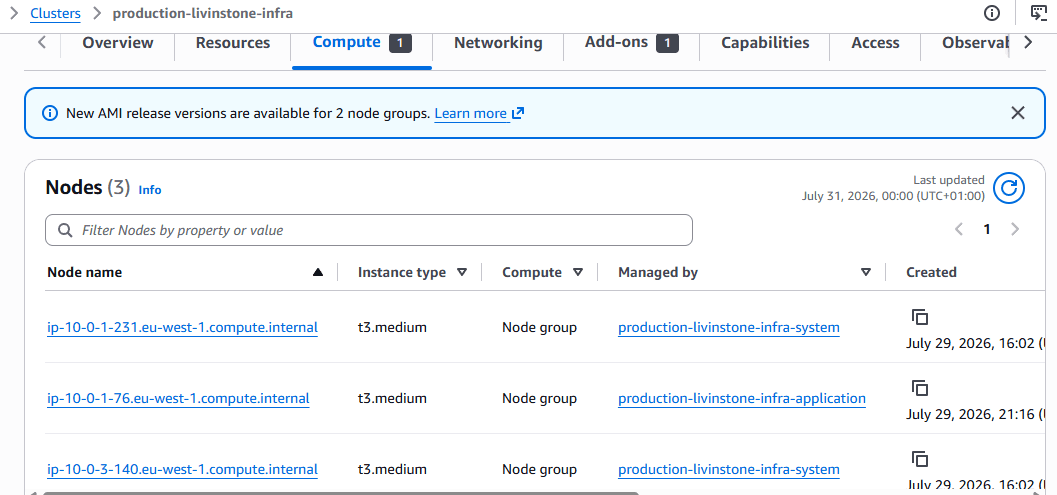
I learned the hard way why you need separate node groups. Before we split them, a traffic spike would consume all resources on a shared node, CoreDNS would get evicted, and DNS would break cluster-wide. Every pod that tried to make a network call would fail. The system node taint prevents application pods from landing on system nodes at all — so a spike in application traffic cannot touch the infrastructure running everything else.
Create modules/node-groups/main.tf:
# IAM role for all nodes — gives them permissions to join the cluster
# and pull images from ECR
data "aws_iam_policy_document" "node_assume_role" {
  statement {
    effect  = "Allow"
    actions = ["sts:AssumeRole"]
    principals {
      type        = "Service"
      identifiers = ["ec2.amazonaws.com"]
    }
  }
}

resource "aws_iam_role" "node" {
  name               = "${var.environment}-${var.project_name}-node-role"
  assume_role_policy = data.aws_iam_policy_document.node_assume_role.json
  tags               = var.tags
}

resource "aws_iam_role_policy_attachment" "node_worker" {
  role       = aws_iam_role.node.name
  policy_arn = "arn:aws:iam::aws:policy/AmazonEKSWorkerNodePolicy"
}
resource "aws_iam_role_policy_attachment" "node_cni" {
  role       = aws_iam_role.node.name
  policy_arn = "arn:aws:iam::aws:policy/AmazonEKS_CNI_Policy"
}
resource "aws_iam_role_policy_attachment" "node_ecr" {
  role       = aws_iam_role.node.name
  policy_arn = "arn:aws:iam::aws:policy/AmazonEC2ContainerRegistryReadOnly"
}
resource "aws_iam_role_policy_attachment" "node_ssm" {
  role       = aws_iam_role.node.name
  policy_arn = "arn:aws:iam::aws:policy/AmazonSSMManagedInstanceCore"
}

# System node group — runs cluster infrastructure only
# The taint ensures application pods cannot be scheduled here
resource "aws_eks_node_group" "system" {
  cluster_name    = var.cluster_name
  node_group_name = "${var.environment}-${var.project_name}-system"
  node_role_arn   = aws_iam_role.node.arn
  subnet_ids      = var.private_subnet_ids
  instance_types  = var.system_instance_types

  scaling_config {
    desired_size = var.system_desired_size
    min_size     = var.system_min_size
    max_size     = var.system_max_size
  }

  taint {
    key    = "dedicated"
    value  = "system"
    effect = "NO_SCHEDULE"
  }

  labels = { role = "system" }
  tags   = var.tags

  depends_on = [
    aws_iam_role_policy_attachment.node_worker,
    aws_iam_role_policy_attachment.node_cni,
    aws_iam_role_policy_attachment.node_ecr,
    aws_iam_role_policy_attachment.node_ssm,
  ]
}

# Application node group — runs workloads
# Tags allow Cluster Autoscaler to discover and manage this group
resource "aws_eks_node_group" "application" {
  cluster_name    = var.cluster_name
  node_group_name = "${var.environment}-${var.project_name}-application"
  node_role_arn   = aws_iam_role.node.arn
  subnet_ids      = var.private_subnet_ids
  instance_types  = var.application_instance_types

  scaling_config {
    desired_size = var.application_desired_size
    min_size     = var.application_min_size
    max_size     = var.application_max_size
  }

  labels = { role = "application" }

  tags = merge(var.tags, {
    "k8s.io/cluster-autoscaler/enabled"             = "true"
    "k8s.io/cluster-autoscaler/${var.cluster_name}" = "owned"
  })

  depends_on = [
    aws_iam_role_policy_attachment.node_worker,
    aws_iam_role_policy_attachment.node_cni,
    aws_iam_role_policy_attachment.node_ecr,
    aws_iam_role_policy_attachment.node_ssm,
  ]
}
Step 3: Add-ons
Each add-on gets its own IRSA role scoped to exactly what it needs — the Load Balancer Controller can create and manage load balancers, the Cluster Autoscaler can describe and modify Auto Scaling groups, and that is it. No shared node credentials that a compromised pod could use to do something far beyond what it should be able to do.
Create modules/addons/main.tf:
terraform {
  required_providers {
    helm = { source = "hashicorp/helm"; version = "~> 2.0" }
  }
}

# Creates ALBs and NLBs from Kubernetes Ingress and Service objects
resource "helm_release" "aws_load_balancer_controller" {
  name       = "aws-load-balancer-controller"
  repository = "https://aws.github.io/eks-charts"
  chart      = "aws-load-balancer-controller"
  namespace  = "kube-system"
  version    = "1.8.1"

  set { name = "clusterName";           value = var.cluster_name }
  set { name = "serviceAccount.create"; value = "true" }
  set {
    name  = "serviceAccount.annotations.eks\.amazonaws\.com/role-arn"
    value = var.lb_controller_role_arn   # IRSA role — scoped to LB permissions only
  }
}

# Scales application node group up when pods are pending, down when nodes are idle
resource "helm_release" "cluster_autoscaler" {
  name       = "cluster-autoscaler"
  repository = "https://kubernetes.github.io/autoscaler"
  chart      = "cluster-autoscaler"
  namespace  = "kube-system"
  version    = "9.37.0"

  set { name = "autoDiscovery.clusterName"; value = var.cluster_name }
  set { name = "awsRegion";                 value = var.region }
  set {
    name  = "rbac.serviceAccount.annotations.eks\.amazonaws\.com/role-arn"
    value = var.cluster_autoscaler_role_arn   # IRSA role — scoped to autoscaling permissions
  }
}

# Enables kubectl top pods/nodes and the Horizontal Pod Autoscaler
resource "helm_release" "metrics_server" {
  name       = "metrics-server"
  repository = "https://kubernetes-sigs.github.io/metrics-server/"
  chart      = "metrics-server"
  namespace  = "kube-system"
  version    = "3.12.1"
}
Step 4: Wire Up the Production Environment
The environment file is where all four modules connect. Networking runs first, outputs the VPC and subnet IDs, and those flow directly into the EKS module. Node groups wait for the cluster to exist. Add-ons wait for nodes to be ready before Helm tries to install anything. The order matters and the depends_on blocks enforce it.
Create environments/production/main.tf:
terraform {
  required_version = ">= 1.5"
  required_providers {
    aws  = { source = "hashicorp/aws";  version = "~> 5.0" }
    helm = { source = "hashicorp/helm"; version = "~> 2.0" }
  }

  backend "s3" {
    bucket         = "livinstone-infra-tfstate-506456084401"  # from bootstrap output
    key            = "production/terraform.tfstate"
    region         = "eu-west-1"
    encrypt        = true
    dynamodb_table = "livinstone-infra-tfstate-lock"
  }
}

provider "aws" {
  region = var.region
  default_tags { tags = local.tags }
}

# Helm provider authenticates against the cluster using the endpoint and cert from the EKS module
provider "helm" {
  kubernetes {
    host                   = module.eks.cluster_endpoint
    cluster_ca_certificate = base64decode(module.eks.cluster_certificate_authority_data)
    exec {
      api_version = "client.authentication.k8s.io/v1beta1"
      command     = "aws"
      args        = ["eks", "get-token", "--cluster-name", module.eks.cluster_name]
    }
  }
}

locals {
  tags = {
    Project     = var.project_name
    Environment = var.environment
    ManagedBy   = "terraform"
  }
}

# Part 1 — Networking (VPC, subnets, NAT gateways)
module "networking" {
  source               = "../../modules/networking"
  project_name         = var.project_name
  environment          = var.environment
  vpc_cidr             = var.vpc_cidr
  availability_zones   = var.availability_zones
  private_subnet_cidrs = var.private_subnet_cidrs
  public_subnet_cidrs  = var.public_subnet_cidrs
  tags                 = local.tags
}

# Part 2 — EKS control plane (uses vpc_id and subnet IDs from networking above)
module "eks" {
  source             = "../../modules/eks"
  project_name       = var.project_name
  environment        = var.environment
  cluster_version    = var.cluster_version
  vpc_id             = module.networking.vpc_id
  private_subnet_ids = module.networking.private_subnet_ids
  allowed_cidrs      = var.allowed_cidrs
  tags               = local.tags
}

# Part 2 — System and application node groups
module "node_groups" {
  source                     = "../../modules/node-groups"
  project_name               = var.project_name
  environment                = var.environment
  cluster_name               = module.eks.cluster_name
  private_subnet_ids         = module.networking.private_subnet_ids
  application_instance_types = var.application_instance_types
  application_min_size       = var.application_min_size
  application_max_size       = var.application_max_size
  application_desired_size   = var.application_desired_size
  tags                       = local.tags
}

# IRSA roles — each add-on gets its own scoped IAM role via the cluster OIDC provider
module "lb_controller_irsa" {
  source                                 = "terraform-aws-modules/iam/aws//modules/iam-role-for-service-accounts-eks"
  version                                = "~> 5.0"
  role_name                              = "${var.environment}-${var.project_name}-lb-controller"
  attach_load_balancer_controller_policy = true
  oidc_providers = {
    main = {
      provider_arn               = module.eks.oidc_provider_arn
      namespace_service_accounts = ["kube-system:aws-load-balancer-controller"]
    }
  }
}

module "cluster_autoscaler_irsa" {
  source                           = "terraform-aws-modules/iam/aws//modules/iam-role-for-service-accounts-eks"
  version                          = "~> 5.0"
  role_name                        = "${var.environment}-${var.project_name}-cluster-autoscaler"
  attach_cluster_autoscaler_policy = true
  cluster_autoscaler_cluster_names = [module.eks.cluster_name]
  oidc_providers = {
    main = {
      provider_arn               = module.eks.oidc_provider_arn
      namespace_service_accounts = ["kube-system:cluster-autoscaler-aws-cluster-autoscaler"]
    }
  }
}

# Part 2 — Add-ons (waits for node groups to be ready before installing)
module "addons" {
  source                      = "../../modules/addons"
  cluster_name                = module.eks.cluster_name
  region                      = var.region
  lb_controller_role_arn      = module.lb_controller_irsa.iam_role_arn
  cluster_autoscaler_role_arn = module.cluster_autoscaler_irsa.iam_role_arn
  depends_on                  = [module.node_groups]
}
Step 5: Deploy
cd environments/production

# Download providers and modules
terraform init

# Review the full plan — should show ~50 resources to create
terraform plan -out=prod.tfplan

# Apply — takes 15-20 minutes
# EKS control plane creation is the slowest part
terraform apply prod.tfplan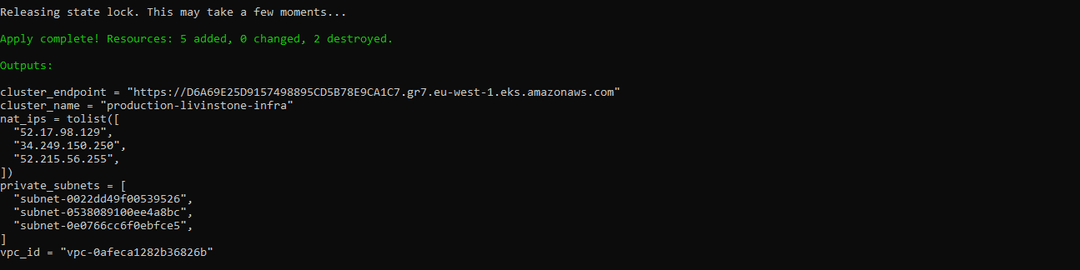
Step 6: Configure kubectl and Verify
# Update kubeconfig to point to the new cluster
aws eks update-kubeconfig --name production-livinstone-infra --region eu-west-1

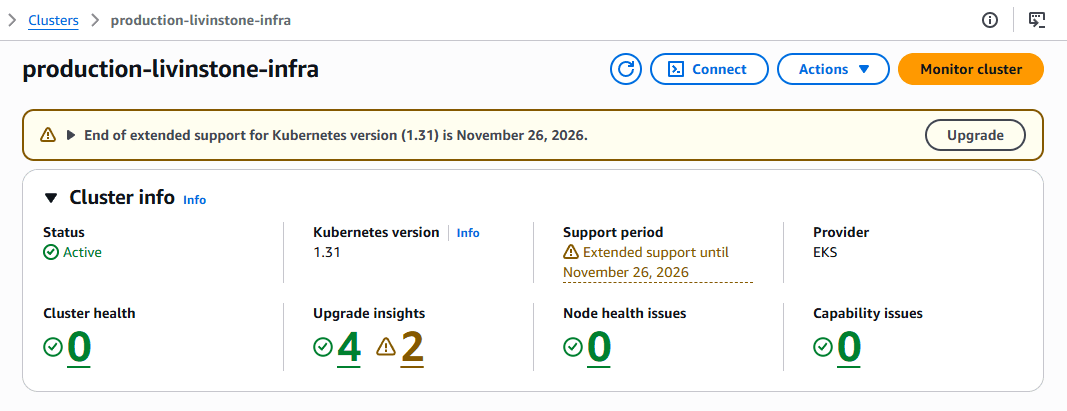
# Verify all nodes are Ready
kubectl get nodes -o wide
# NAME                                      STATUS   ROLES    AGE
# ip-10-0-1-xx.eu-west-1.compute.internal  Ready    none     3m   ← system node
# ip-10-0-2-xx.eu-west-1.compute.internal  Ready    none     3m   ← system node
# ip-10-0-1-yy.eu-west-1.compute.internal  Ready    none     3m   ← application node
# ip-10-0-2-yy.eu-west-1.compute.internal  Ready    none     3m   ← application node

# Verify all add-ons are running
kubectl get pods -n kube-system
# coredns                           Running  ← on system nodes
# kube-proxy                        Running
# aws-node (VPC CNI)                Running
# ebs-csi-controller                Running
# aws-load-balancer-controller      Running  ← IRSA role attached
# cluster-autoscaler                Running  ← IRSA role attached
# metrics-server                    Running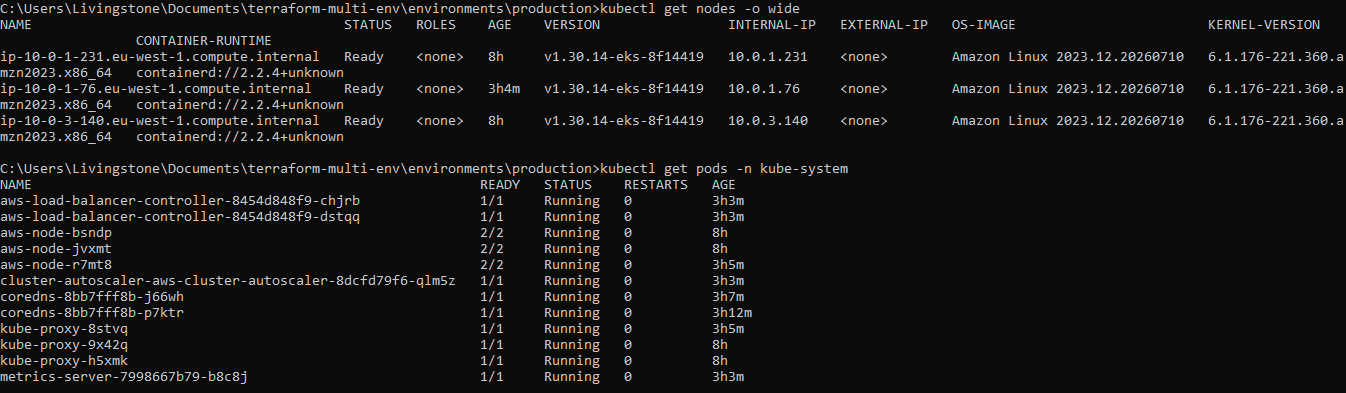
Complete source code: eks-terraform-foundation. This cluster is the foundation for the Argo CD GitOps setup and the observability stack.
Comments
All comments are reviewed before appearing.
Leave a Comment