
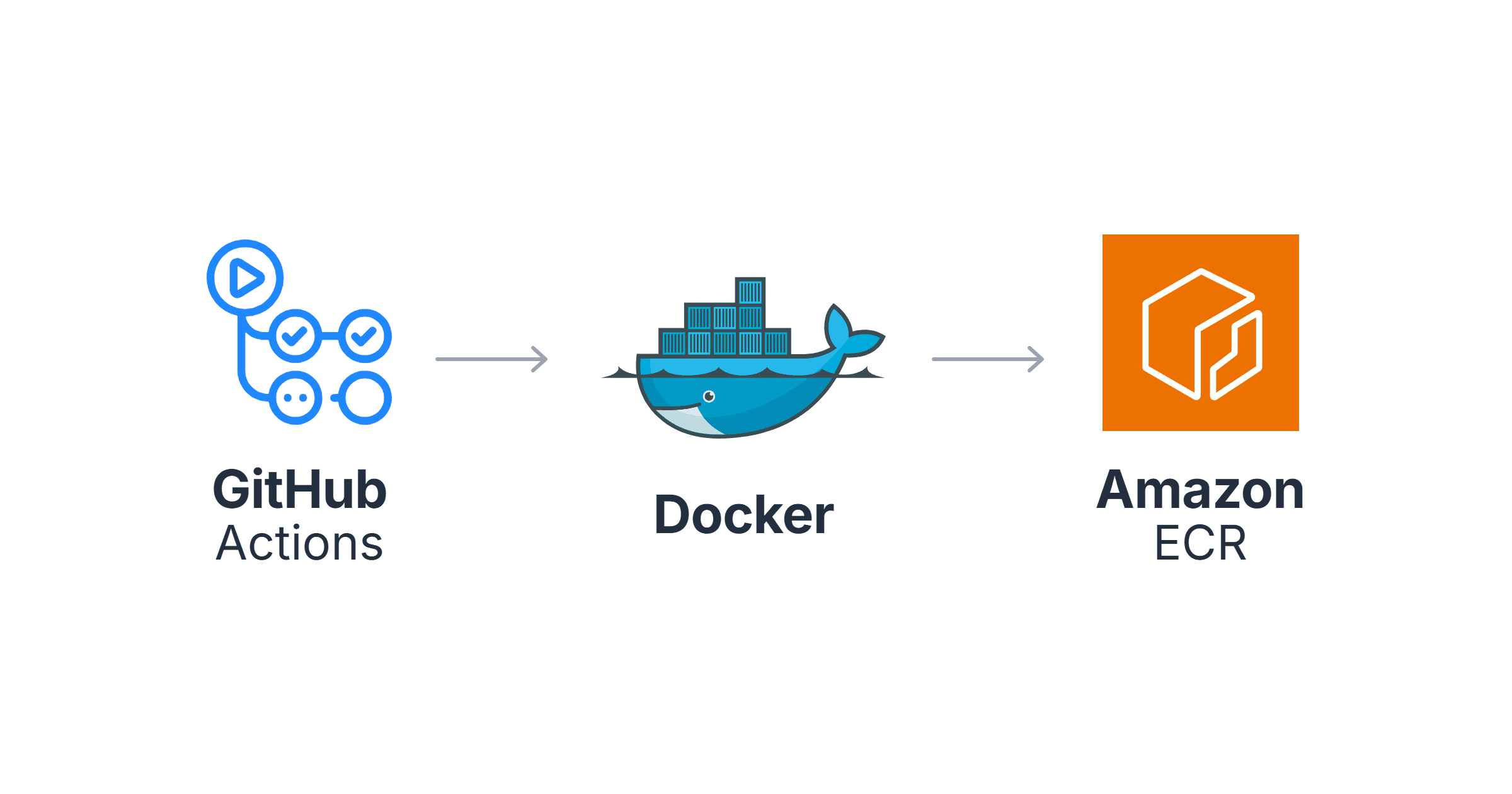
I used to deploy applications by running a shell script from my laptop. The process was straightforward: build the Docker image, push it to Amazon ECR, then update the Kubernetes deployment with kubectl set image. It worked, but it relied on manual steps, offered little visibility into what had been deployed, and made every release dependent on the person running the commands.
Moving the deployment pipeline into GitHub Actions solved those problems. Every merge to main now runs the same sequence automatically—testing the application, building the image, scanning it for vulnerabilities, pushing it to ECR, and deploying it to Kubernetes. Every deployment is repeatable, traceable, and recorded in GitHub.
The goal isn't simply to automate deployments. It's to make every deployment repeatable, auditable, and safe. If something breaks, you should know exactly which commit introduced the change and be able to roll back in minutes — not scramble through terminal history trying to figure out what was deployed last.

Prerequisites
AWS CLI v2 configured
An ECR repository to push images to
A Kubernetes cluster with
kubectlconfiguredA GitHub repository with your application code
aws ecr create-repository --repository-name my-app --region eu-west-1Why GitHub Actions Over CodeBuild?
CodeBuild is already handling CI in this setup — it builds the image and pushes to ECR. So why GitHub Actions? CodeBuild lives entirely inside AWS. That's great for security but means the pipeline is invisible unless you're in the AWS Console. GitHub Actions lives where the code lives. The workflow file is in the repo, the run history is in GitHub, and any developer can see what deployed and when without AWS access. For teams that don't want to give every engineer AWS Console access, that visibility matters.
Jenkins solves the same problem but requires a server to maintain, plugins to keep updated, and credentials to manage separately. For a Kubernetes deployment pipeline, that operational overhead rarely justifies itself when GitHub Actions is already available where your code lives.
Why ECR over Docker Hub? ECR lives inside your AWS account. Images never leave your network boundary, access is controlled by IAM, and you do not pay egress fees when EKS nodes pull from ECR in the same region. Docker Hub is fine for public images. For production workloads, keep images in ECR.
Step 1: Authenticate to AWS (OIDC, Not Access Keys)
There are two ways to authenticate GitHub Actions with AWS. One is correct, one is legacy.
Option A: OIDC (Recommended)
OIDC lets GitHub Actions assume an IAM role directly using a temporary token. No long-lived credentials stored anywhere. Nothing to rotate. Nothing to leak.
- name: Configure AWS credentials
  uses: aws-actions/configure-aws-credentials@v4
  with:
    role-to-assume: arn:aws:iam::YOUR_ACCOUNT_ID:role/github-actions-deploy
    aws-region: eu-west-1
First create the OIDC provider in AWS (once per account):
aws iam create-open-id-connect-provider \
  --url https://token.actions.githubusercontent.com \
  --client-id-list sts.amazonaws.com \
  --thumbprint-list 6938fd4d98bab03faadb97b34396831e3780aea1
Then create an IAM role with this trust policy:
{
  "Effect": "Allow",
  "Principal": {
    "Federated": "arn:aws:iam::YOUR_ACCOUNT_ID:oidc-provider/token.actions.githubusercontent.com"
  },
  "Action": "sts:AssumeRoleWithWebIdentity",
  "Condition": {
    "StringEquals": {
      "token.actions.githubusercontent.com:aud": "sts.amazonaws.com"
    },
    "StringLike": {
      "token.actions.githubusercontent.com:sub": "repo:YOUR_USERNAME@YOUR_USER_ID/YOUR_REPO@YOUR_REPO_ID:*"
    }
  }
}
The immutable sub claim. GitHub's sub claim now uses a format that includes numeric user and repository IDs — not just the name. The format is
repo:USERNAME@USER_ID/REPO@REPO_ID:*. If your trust policy uses the simple name format, the assume-role call fails with a generic "Not authorized" error. To find your exact sub value, add a temporary step to decode the JWT mid-pipeline:- name: Debug OIDC token run: | TOKEN=$(curl -s -H "Authorization: bearer $ACTIONS_ID_TOKEN_REQUEST_TOKEN" \ "$ACTIONS_ID_TOKEN_REQUEST_URL&audience=sts.amazonaws.com" | jq -r '.value') echo $TOKEN | cut -d. -f2 | base64 -d 2>/dev/null | python3 -m json.toolThe
subfield in the output is the exact value your trust policy needs to match.
The IAM role also needs these permissions attached:
aws iam attach-role-policy \
  --role-name github-actions-eks-deploy \
  --policy-arn arn:aws:iam::aws:policy/AmazonEC2ContainerRegistryPowerUser

# Add role to EKS aws-auth ConfigMap so it can authenticate against the cluster
kubectl edit configmap aws-auth -n kube-system
# Add under mapRoles:
# - rolearn: arn:aws:iam::YOUR_ACCOUNT_ID:role/github-actions-eks-deploy
#   username: github-actions
#   groups:
#     - system:masters
Production note: Make the IAM role as narrow as possible. It only needs permission to push to ECR and update the specific Kubernetes deployment. Giving it broad AWS access is the same as putting your root credentials in a GitHub Secret.
Option B: Access Keys (Legacy)
If OIDC is not an option, store credentials as GitHub Secrets under Settings → Secrets and Variables → Actions:
AWS_ACCESS_KEY_ID
AWS_SECRET_ACCESS_KEY
AWS_REGION           # eu-west-1
Production note: Long-lived access keys are a persistent security risk. If you must use them, rotate them regularly, scope them to minimum permissions, and treat them with the same care as a production database password.
Step 2: Build the Image. Why Commit SHA?
Every image gets tagged with the Git commit SHA, not just latest. This matters more than it sounds. latest is mutable — it can point to a completely different image every time it is pulled. A commit SHA is immutable. When you run kubectl describe pod and see an image tag, you know exactly which commit is running. Rollback becomes as simple as pointing to a previous SHA.
- name: Build Docker image
  env:
    ECR_REGISTRY: ${{ steps.login-ecr.outputs.registry }}
  run: |
    docker build \
      --pull \
      -t $ECR_REGISTRY/$ECR_REPOSITORY:$IMAGE_TAG \
      -t $ECR_REGISTRY/$ECR_REPOSITORY:latest \
      ./apps/api
Why
--pull? This tells Docker to always fetch the latest version of the base image rather than using a cached layer. Base image security patches are picked up on every build — without it, a cached layer from weeks ago could hide a known vulnerability.
Production note: Always push both the SHA tag andlatest. The SHA tag gives you traceability.latestis useful for pulling the most recent version without knowing the SHA — but deployments should always reference the SHA, notlatest.
Step 3: Scan Before You Push. Why Trivy?
Trivy scans the image for known vulnerabilities before it goes anywhere near ECR or the cluster. The key decision here is where in the pipeline the scan runs. Scanning after push means vulnerable images are already in your registry. Scanning before push means nothing gets stored if the scan fails.
- name: Scan image for vulnerabilities
  uses: aquasecurity/trivy-action@ed142fd0673e97e23eac54620cfb913e5ce36c25 # v0.36.0
  with:
    image-ref: "${{ steps.login-ecr.outputs.registry }}/${{ env.ECR_REPOSITORY }}:${{ env.IMAGE_TAG }}"
    format: "table"
    exit-code: "1"
    severity: "CRITICAL,HIGH"
    ignore-unfixed: true
    trivyignores: apps/api/.trivyignore
What is .trivyignore? For base image CVEs that have no fix available in the current Alpine release, add a .trivyignore file listing the CVE IDs. Trivy still reports them but won't block the pipeline. Document why each CVE is ignored — "no fix available in current alpine release" is a legitimate and honest reason.
Setting exit-code: "1" on CRITICAL and HIGH means the pipeline stops here if serious vulnerabilities are found. The image never reaches ECR. This is the fail-fast principle applied to security.
Step 4: Push to ECR and Deploy
- name: Push to ECR
  run: |
    docker push ${{ secrets.ECR_REPOSITORY }}:${{ env.IMAGE_TAG }}
    docker push ${{ secrets.ECR_REPOSITORY }}:latest

- name: Deploy to Kubernetes
  run: |
    echo "${{ secrets.KUBE_CONFIG }}" | base64 -d > /tmp/kubeconfig
    export KUBECONFIG=/tmp/kubeconfig
    kubectl set image deployment/my-app \
      my-app=${{ secrets.ECR_REPOSITORY }}:${{ env.IMAGE_TAG }} \
      -n production
    kubectl rollout status deployment/my-app -n production --timeout=5m

- name: Verify
  run: |
    export KUBECONFIG=/tmp/kubeconfig
    kubectl get pods -n production -l app=my-app
    echo "Deployed: ${{ secrets.ECR_REPOSITORY }}:${{ env.IMAGE_TAG }}"
Production note:
kubectl set imageworks for simple setups but bypasses your Helm chart and leaves no trace in Git. The pipeline's job is to get the image into ECR — deploying to the cluster belongs in GitOps. In Part 5, Argo CD picks up from here: the pipeline commits the new image tag to the config repo, and Argo CD syncs the cluster automatically. Nokubectlcommands in CI, no direct cluster access required.
The Dockerfile: Why Multi-Stage?
A multi-stage build separates what you need to build from what you need to run. The builder stage installs all dependencies including dev tools. The runner stage copies only production dependencies and compiled output — no source code, no dev tooling, smaller image, reduced attack surface.
FROM node:24-alpine AS builder
WORKDIR /app
COPY package*.json ./
RUN npm ci --omit=dev --ignore-scripts

COPY src/ ./src/

FROM node:24-alpine AS runner
WORKDIR /app
ENV NODE_ENV=production
COPY --from=builder /app/node_modules ./node_modules
COPY --from=builder /app/src ./src
EXPOSE 3000
USER node
CMD ["node", "src/index.js"]
If your application is packaged with Helm — as it should be in most production environments — the image tag lives in values.yaml. Updating that file and committing it is what makes GitOps straightforward: the pipeline updates the tag, Argo CD detects the change, and the cluster syncs. The kubectl set image step above works for simpler setups but does not scale to that pattern.
The Full Workflow
name: Build, Test, and Deploy

on:
  push:
    branches:
      - master

env:
  IMAGE_TAG: ${{ github.sha }}

jobs:
  test:
    runs-on: ubuntu-latest
    steps:
      - uses: actions/checkout@v4
      - uses: actions/setup-node@v4
        with:
          node-version: "24"
          cache: "npm"
      - run: npm ci
      - run: npm test
      - run: npm run lint

  build-and-deploy:
    runs-on: ubuntu-latest
    needs: test
    permissions:
      id-token: write
      contents: read
    steps:
      - uses: actions/checkout@v4

      - name: Configure AWS credentials
        uses: aws-actions/configure-aws-credentials@v4
        with:
          role-to-assume: arn:aws:iam::YOUR_ACCOUNT_ID:role/github-actions-deploy
          aws-region: eu-west-1

      - name: Login to ECR
        uses: aws-actions/amazon-ecr-login@v2

      - name: Build image
        run: |
          docker build -t ${{ secrets.ECR_REPOSITORY }}:${{ env.IMAGE_TAG }} .
          docker tag ${{ secrets.ECR_REPOSITORY }}:${{ env.IMAGE_TAG }} ${{ secrets.ECR_REPOSITORY }}:latest

      - name: Scan for vulnerabilities
        uses: aquasecurity/trivy-action@ed142fd0673e97e23eac54620cfb913e5ce36c25 # v0.36.0
        with:
          image-ref: "${{ secrets.ECR_REPOSITORY }}:${{ env.IMAGE_TAG }}"
          format: "table"
          exit-code: "1"
          severity: "CRITICAL,HIGH"
          ignore-unfixed: true
          trivyignores: apps/api/.trivyignore

      - name: Push to ECR
        run: |
          docker push ${{ secrets.ECR_REPOSITORY }}:${{ env.IMAGE_TAG }}
          docker push ${{ secrets.ECR_REPOSITORY }}:latest

      - name: Deploy
        run: |
          echo "${{ secrets.KUBE_CONFIG }}" | base64 -d > /tmp/kubeconfig
          export KUBECONFIG=/tmp/kubeconfig
          kubectl set image deployment/my-app \
            my-app=${{ secrets.ECR_REPOSITORY }}:${{ env.IMAGE_TAG }} \
            -n production
          kubectl rollout status deployment/my-app -n production --timeout=5m
The workflow above is slightly condensed for readability. The complete file — with the pinned Trivy SHA, .trivyignore, and all production settings — is in the repo: eks-app-deployment/.github/workflows/deploy.yml.
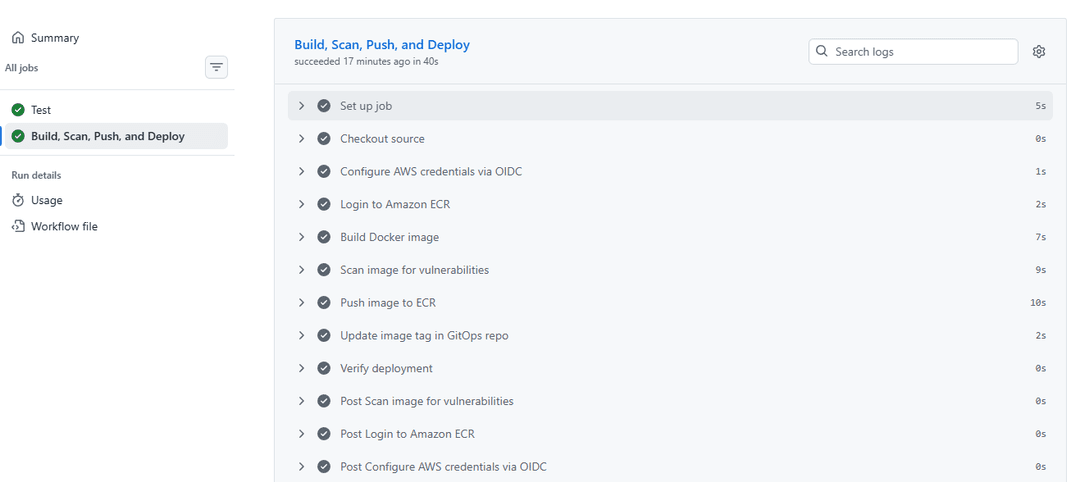
To run it: push any small change to master, or trigger it manually from the Actions tab using the Run workflow button — that is what workflow_dispatch enables. Watch the two jobs run in sequence — the test job must pass before build-and-deploy starts. Each step logs its output in real time. When the Trivy step shows a clean table and the push step confirms both SHA and latest tags, the image is in ECR and the pipeline has done its job.
Rolling Back
Because every image is tagged with a commit SHA, rollback is precise. You know exactly what you are going back to:
git log --oneline | head -5

kubectl set image deployment/my-app \
  my-app=123456789.dkr.ecr.eu-west-1.amazonaws.com/my-app:PREVIOUS_SHA \
  -n production

kubectl rollout status deployment/my-app -n production
If you move to GitOps with Argo CD — which the next post covers — rollback becomes a git revert. The pipeline itself becomes the deployment record, and every rollback has an author and a reason in the Git history.
Key Takeaways
Use OIDC over long-lived access keys — no credentials to rotate or leak
Tag images with commit SHAs, not just
latest— every deployment should be traceable to a specific commitScan before you push — a vulnerable image that never reaches the registry is better than one that does
Fail fast — tests and security scans should stop the pipeline before anything reaches production
Keep deployment history in GitHub — every deploy has an author, a timestamp, and a diff
Next: GitOps with Argo CD — replacing the kubectl set image step here with automatic deployments driven entirely from Git.
Comments
All comments are reviewed before appearing.
Leave a Comment