

After Part 3, deploying a new version meant running helm upgrade manually, checking the rollout succeeded, and hoping nobody else ran a deployment at the same time. That works when you are the only person touching the cluster. It stops working the moment a team gets involved — or when you come back to your own cluster after a few weeks and cannot remember what state it should be in.
This post sets up Argo CD on the EKS cluster from Part 2 and wires it to the application from Part 3. The full config is in eks-gitops. Before any installation — what GitOps actually is, and why it changes how deployments work.
What Is GitOps?
Before installing anything, it's worth understanding what GitOps actually means in practice. It's not just "deploy from Git." It's a shift in how you think about cluster state.

In a traditional workflow, the cluster state lives in someone's head — or in terminal history. In a GitOps workflow, the cluster state lives in Git. Instead of engineers applying manifests manually with kubectl or running helm upgrade on their laptops, all changes are made through pull requests. A controller — Argo CD in this case — continuously compares the desired state stored in Git with the actual state running in the cluster and reconciles any differences. If they match, the application is marked Synced. If someone makes a manual change or a new commit is pushed, Argo CD detects the drift and — if automated sync is enabled — reconciles the cluster back to the desired state automatically.
Drift detection is one of the most valuable things Argo CD provides. Before GitOps, I had no reliable way to know whether the cluster was actually running what I thought it was. With Argo CD, if the cluster ever drifts from Git, I know immediately.
The practical consequence: from this point onward, nobody should be SSH-ing into production to deploy applications. Git becomes the deployment interface. Every deployment has an author, a timestamp, and a reason — because every deployment goes through a pull request.

Why Two Repos?
The app repo — eks-app-deployment — holds the source code and Helm chart. A separate config repo — eks-gitops — holds Argo CD Application manifests and environment-specific values.
This matters because when something breaks in production, you look at the config repo commit history to see exactly what changed and when. Application developers push to the app repo. Deployment configuration changes go to the config repo. The two never collide, and the Git history of the config repo is your deployment log.
eks-gitops/
├── apps/
│   ├── api-production.yaml   # Argo CD Application — production
│   └── api-dev.yaml          # Argo CD Application — dev
├── environments/
│   ├── production/
│   │   └── values.yaml       # image tag lives here — updated by Image Updater
│   └── dev/
│       └── values.yaml
└── install/
    ├── install-argocd.sh
    └── install-image-updater.sh
Installing Argo CD
kubectl create namespace argocd
kubectl apply -n argocd -f https://raw.githubusercontent.com/argoproj/argo-cd/stable/manifests/install.yaml

kubectl wait --for=condition=ready pod   -l app.kubernetes.io/name=argocd-server   -n argocd --timeout=120s

kubectl get pods -n argocd
# argocd-application-controller-0   1/1   Running
# argocd-repo-server-xxx             1/1   Running
# argocd-server-xxx                  1/1   Running
# Get the initial admin password
kubectl -n argocd get secret argocd-initial-admin-secret -o jsonpath="{.data.password}" | base64 -d && echo
# Access the UI
kubectl port-forward svc/argocd-server -n argocd 8080:443
# Open https://localhost:8080 — username: admin
The Application Manifest: What Each Setting Does
An Argo CD Application tells Argo CD where the config lives in Git and where to deploy it. Worth going through each key setting:
apiVersion: argoproj.io/v1alpha1
kind: Application
metadata:
  name: api-production
  namespace: argocd
spec:
  project: default
  source:
    repoURL: https://github.com/TisigheLivinstone/eks-app-deployment
    targetRevision: master
    path: helm/api-chart
    helm:
      releaseName: api            # ensures pods are named api-api-xxx consistently
      valueFiles:
        - values.yaml
        - values-prod.yaml         # environment-specific overrides
  destination:
    server: https://kubernetes.default.svc
    namespace: production
  syncPolicy:
    automated:
      prune: true       # delete resources removed from Git
      selfHeal: true    # revert manual changes made directly to the cluster
    syncOptions:
      - CreateNamespace=true
    retry:
      limit: 3
      backoff:
        duration: 10s
        maxDuration: 3m
        factor: 2
Why prune: true? If you remove a resource from Git — say you delete a ConfigMap — without prune, Argo CD syncs everything else but leaves the orphaned ConfigMap running. With prune: true, Git is the authoritative list. What is not in Git does not exist in the cluster.
Why selfHeal: true? If someone runs a manual kubectl command that changes the cluster state, Argo CD reverts it within 3 minutes. This sounds aggressive. It is. That is the point. Emergency changes go through Git, not through the terminal.
Production note: The IAM role Argo CD uses should have the minimum permissions needed — apply, update, and delete resources in the target namespaces only. A continuously running controller with broad permissions is a significant attack surface.
kubectl apply -f apps/api-production.yaml

kubectl get applications -n argocd
# NAME              SYNC STATUS   HEALTH STATUS
# api-production    Synced        Healthy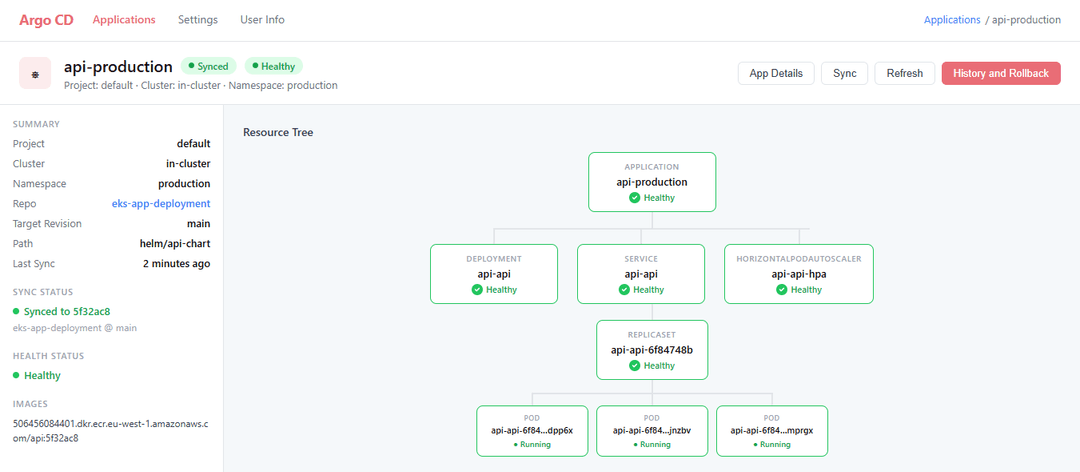
How the Reconciliation Loop Works
Every 3 minutes, Argo CD polls the Git repo. It compares the desired state in Git against the actual state in the cluster. If they differ, it applies the difference. If they match, it does nothing. This loop runs continuously without human involvement.

The retry configuration handles transient failures. If a pod takes longer than expected to pass the readiness probe, Argo CD retries with exponential backoff rather than alerting immediately. The readiness probe from Part 3 is what Argo CD uses to determine whether a deployment succeeded.
Demonstrating Self-Healing
This is the moment that makes GitOps click. Make a manual change directly to the cluster — the kind of thing someone might do in a real incident — and watch Argo CD revert it:
# Scale the deployment manually — bypassing Git entirely
kubectl scale deployment api-api --replicas=1 -n production

kubectl get deployment api-api -n production
# READY   REPLICAS
# 1/3     1        ← changed manually

# Wait 3 minutes without touching anything
kubectl get deployment api-api -n production
# READY   REPLICAS
# 3/3     3        ← Argo CD reverted it automatically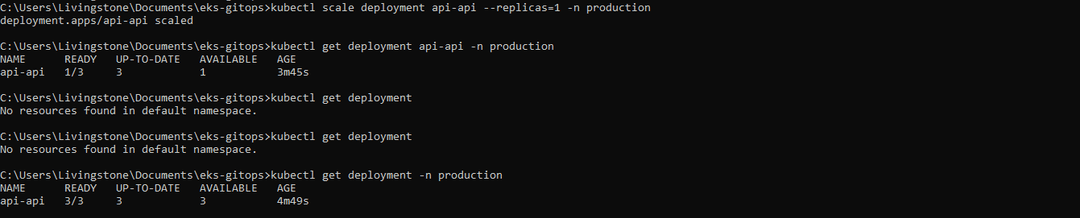
Nobody fixed that manually. The cluster corrected itself because Git says 3 replicas and selfHeal enforces it. That is what GitOps actually means in practice.
Production note: If your team makes regular manual
kubectlchanges in production, that is a process problem — not a reason to disable self-healing. The answer is to commit changes to Git, not to work around the controller.
Automatic Image Updates
After a CI pipeline pushes a new image to ECR, something needs to update the image tag in the config repo. Without that update, Argo CD has nothing new to detect — the cluster stays on the old image even though a new one exists in ECR.
Argo CD Image Updater solves this. It watches your ECR repository, detects new images, and commits the updated tag directly to the config repo. Argo CD then detects that commit and syncs. The entire loop — code push to running pods — happens without a single manual step.
kubectl apply -n argocd \
  -f https://raw.githubusercontent.com/argoproj-labs/argocd-image-updater/stable/manifests/install.yaml

kubectl get pods -n argocd | grep image-updater
# argocd-image-updater-xxx   1/1   Running
Add these annotations to the Application manifest to tell Image Updater which image to watch and how to write the updated tag back to Git:
annotations:
  argocd-image-updater.argoproj.io/image-list: api=YOUR_ACCOUNT_ID.dkr.ecr.eu-west-1.amazonaws.com/api
  argocd-image-updater.argoproj.io/api.update-strategy: latest
  argocd-image-updater.argoproj.io/write-back-method: git
  argocd-image-updater.argoproj.io/git-branch: main
Production note: Image Updater needs write access to the config repo. Create a dedicated Git token scoped to that repo only — write access, nothing else. GitHub Apps are preferable to PATs for production use since they're not tied to an individual account.
The image tag in environments/production/values.yaml uses a real commit SHA — never latest. latest is mutable. A SHA is traceable to a specific commit, which means you know exactly what is running and can roll back to any previous version by SHA:
image:
  repository: YOUR_ACCOUNT_ID.dkr.ecr.eu-west-1.amazonaws.com/api
  tag: 5f32ac8   # Image Updater keeps this current — immutable, traceable
If you are following the full series, the Part 4 pipeline handles this differently — GitHub Actions commits the updated image tag directly to eks-gitops as its final step after a successful build and scan. Same result, different mechanism. Image Updater is not needed in that case, but understanding how it works is worth it — it is the native Argo CD approach and works with any CI tool.
      - name: Update image tag in eks-gitops
        env:
          GITHUB_TOKEN: ${{ secrets.GITOPS_TOKEN }}
        run: |
          git config --global user.email "github-actions@github.com"
          git config --global user.name "GitHub Actions"

          git clone https://x-access-token:${GITHUB_TOKEN}@github.com/TisigheLivinstone/eks-gitops.git /tmp/eks-gitops
          cd /tmp/eks-gitops

          sed -i "s|tag:.*|tag: ${IMAGE_TAG}|g" environments/production/values.yaml

          git commit -am "chore: update api image tag to ${IMAGE_TAG}"
          git push
What Happens After You Push?
Once Image Updater is in place, the entire deployment chain runs without manual steps:

# Watch the full flow from a single push
kubectl get pods -n production -w
# api-api-old-xxx   1/1   Running    → Terminating
# api-api-new-yyy   0/1   Pending    → Running

kubectl get applications -n argocd
# NAME              SYNC STATUS   HEALTH STATUS
# api-production    Synced        Healthy
Rollback Is a Git Revert

# Something broke — find the bad commit
git log --oneline
# 5f32ac8 chore: update image tag  ← this broke things
# abc3f7d fix: adjust HPA thresholds

# Revert it
git revert 5f32ac8
git push
# Argo CD detects the revert within 3 minutes and syncs back
The rollback is itself a commit. It has an author, a timestamp, and it shows up in the Git history. Compare that to running a command against the cluster — which leaves no record anywhere.
Production note:
argocd app rollbackexists for genuine emergencies. But it bypasses Git entirely. Usegit revertby default — your incident record will thank you.
Verify the Full Setup
kubectl get pods -n argocd

kubectl get applications -n argocd
# NAME              SYNC STATUS   HEALTH STATUS
# api-production    Synced        Healthy
# api-dev           Synced        Healthy

kubectl get pods -n production
# api-api-xxx   1/1   Running
# api-api-yyy   1/1   Running
# api-api-zzz   1/1   Running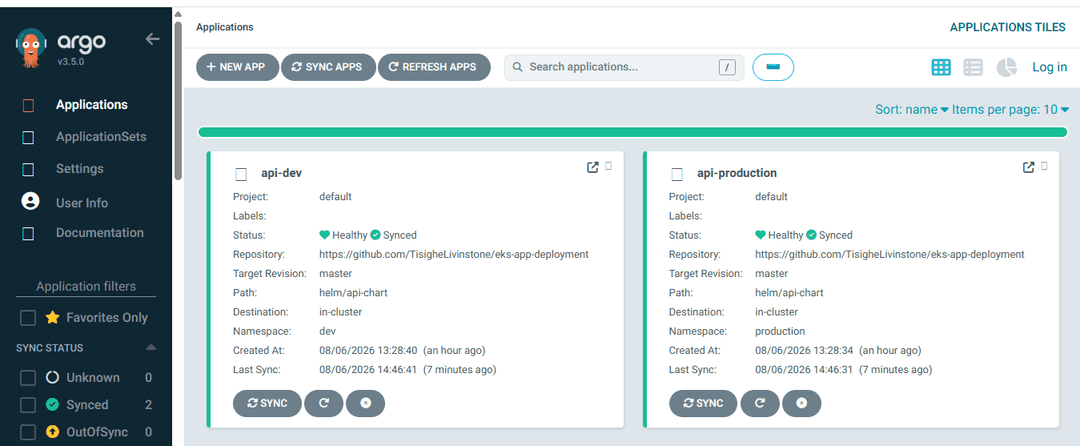
Key Takeaways
Git is the source of truth — not the cluster. Argo CD continuously reconciles actual state toward desired state.
Nobody deploys by running commands anymore. Git is your deployment interface.
prune: true— resources removed from Git are removed from the cluster. No orphaned manifests.selfHeal: true— manual changes are automatically reverted. Make changes through Git, notkubectl.Rollbacks are Git operations — they have an author, a timestamp, and a reason in the history.
Never tag production images with
latest— use commit SHAs. Every deployment should be traceable to a specific commit.
The five posts in this series cover the full stack: networking with Terraform, the EKS cluster, deploying the application, the CI/CD pipeline, and now GitOps. Config repo: eks-gitops.
Comments
All comments are reviewed before appearing.
Leave a Comment